Overview
MedModr is a free, open-source, browser-based application designed for mediation, moderation, and conditional process analysis. It addresses the accessibility gap in advanced statistical modeling by eliminating the need for licensed software, local installation, programming expertise, or account registration. Researchers, educators, and students can perform sophisticated analyses entirely within their web browser, with all computation occurring locally to ensure data privacy and security.
The application implements 15 analytical models equivalent to those available in established tools such as the PROCESS macro, including simple and parallel mediation, serial mediation, moderation, moderated moderation, and multiple moderated mediation variants. MedModr generates comprehensive output including regression tables, bootstrap confidence intervals, standardized and unstandardized coefficients, interactive path diagrams, and simple slopes plots. Built-in data screening, missing data imputation, and dummy coding capabilities further streamline the research workflow from data preparation to publication-ready results.
By providing a freely accessible, user-friendly platform that requires no specialized training or infrastructure, MedModr aims to democratize access to advanced statistical methods and support rigorous, reproducible research across the health, social, behavioral, and educational sciences.

Key Features
Analytical Models
MedModr supports 15 analytical models encompassing simple mediation, parallel mediation, serial mediation, simple moderation, double moderation, moderated moderation, and multiple moderated mediation variants. These models address the majority of conditional process analysis applications in the health, social, behavioral, and educational sciences.
Bootstrap Confidence Intervals
The application computes bootstrap confidence intervals for indirect effects using up to 10,000 resamples with either Percentile or Bias-Corrected (BC) methods. Bootstrap standard errors and confidence intervals are provided for all estimates. The pseudorandom number generator (Mulberry32) uses a fixed seed (default = 12345), ensuring fully reproducible results across operating systems, browsers, and devices.
Interactive Path Diagrams
Auto-generated SVG path diagrams with coefficient overlays are available for eight of the supported models. Users can toggle color schemes, show or hide values and p-values, switch between unstandardized (b) and standardized (β) coefficients, rename variables, and export diagrams as high-resolution PNG or SVG for publication.
Simple Slopes Visualization
Interactive Canvas-based simple slopes plots display the moderator's effect at −1 standard deviation, the mean, and +1 standard deviation. Users can choose between legend-based or in-line annotations, toggle between default and publication-ready styling, and export plots as high-resolution PNG for manuscript preparation.
Missing Data Handling
Seven imputation methods are available for managing incomplete data: mean, median, mode, Predictive Mean Matching (PMM), hot deck, regression-based imputation, and the Expectation-Maximization (EM) algorithm. The application also supports custom missing-value codes (e.g., −999, NA) and listwise deletion.
Data Screening and Quality Assessment
Built-in data screening tools enable direct in-browser data editing, outlier detection using four methods (Z-score, IQR, MAD, and percentile), normality assessment via skewness and kurtosis, and correlation matrix generation (Pearson, Spearman, or Kendall). Histograms and Q-Q plots are also available for visual data quality assessment, with all outputs exportable as PNG.
Categorical Variable Encoding
The application includes integrated dummy coding functionality. Users can select a reference category and encode categorical variables with a single click, eliminating the need for manual recoding. A "Reset Encoding" option restores the original variable coding.
Standardized and Unstandardized Coefficients
Regression tables for mediation models report both unstandardized (b) and standardized (β) coefficients, accompanied by Variance Inflation Factor (VIF) statistics for multicollinearity assessment. Moderation and moderated-mediation outputs present unstandardized coefficients and VIF statistics.
File Formats and Offline Functionality
CSV files are processed entirely offline without requiring an internet connection. Excel (.xlsx) files require a one-time internet connection to load the SheetJS library; subsequent data processing occurs entirely offline.
Results Export
Analysis results can be exported as formatted Word (.doc), PDF, HTML, or CSV documents suitable for publication or presentation. The "Export All to Word" function compiles results from multiple variable combinations into a single comprehensive document.
How It Works
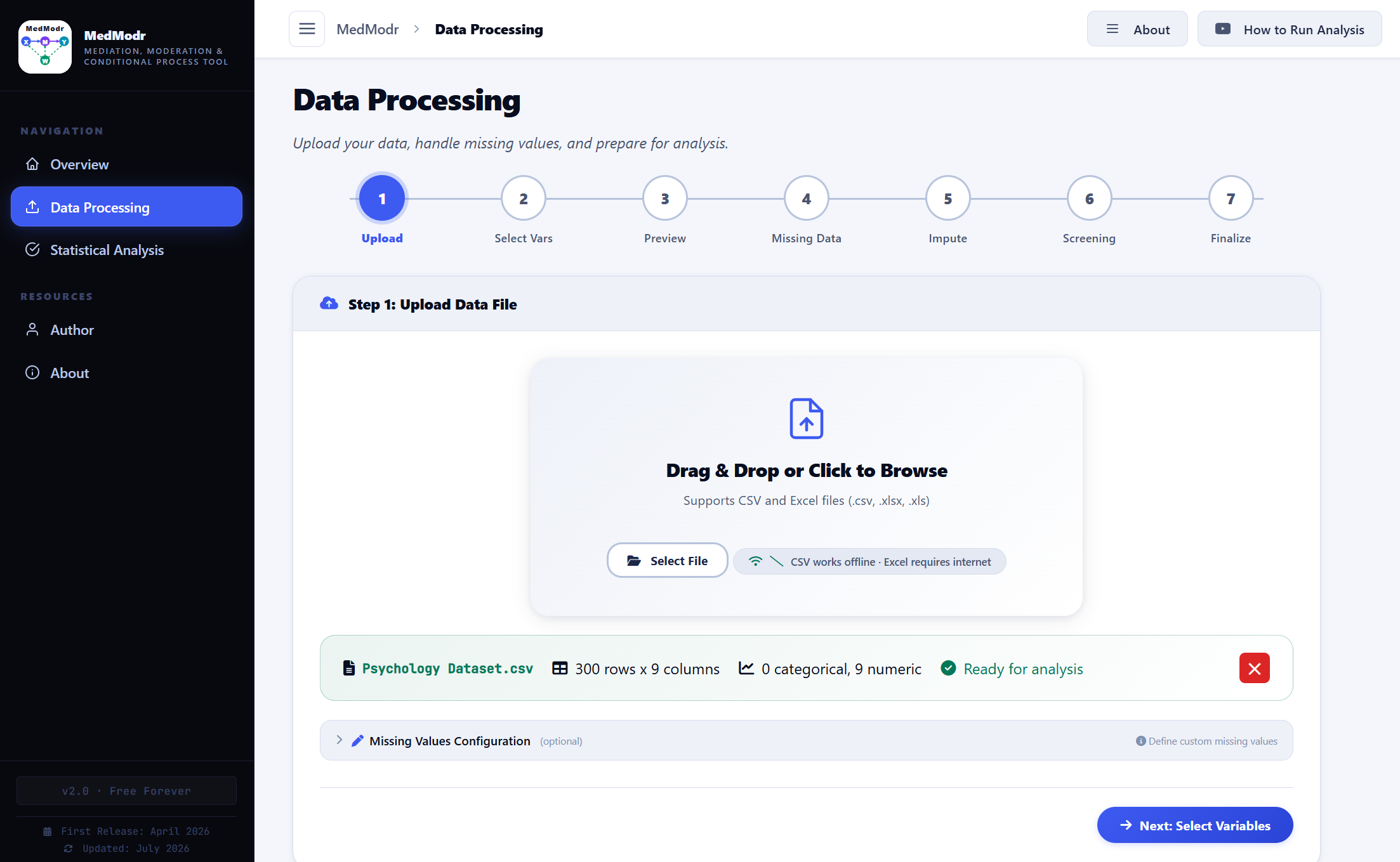
MedModr follows a straightforward two-stage workflow designed to guide you from raw data to publication-ready results.
Stage 1: Data Processing
Detailed Steps
Only the data upload and variable selection steps are mandatory; the remaining steps are optional but recommended for ensuring data quality and appropriate preprocessing.
Stage 2: Statistical Analysis
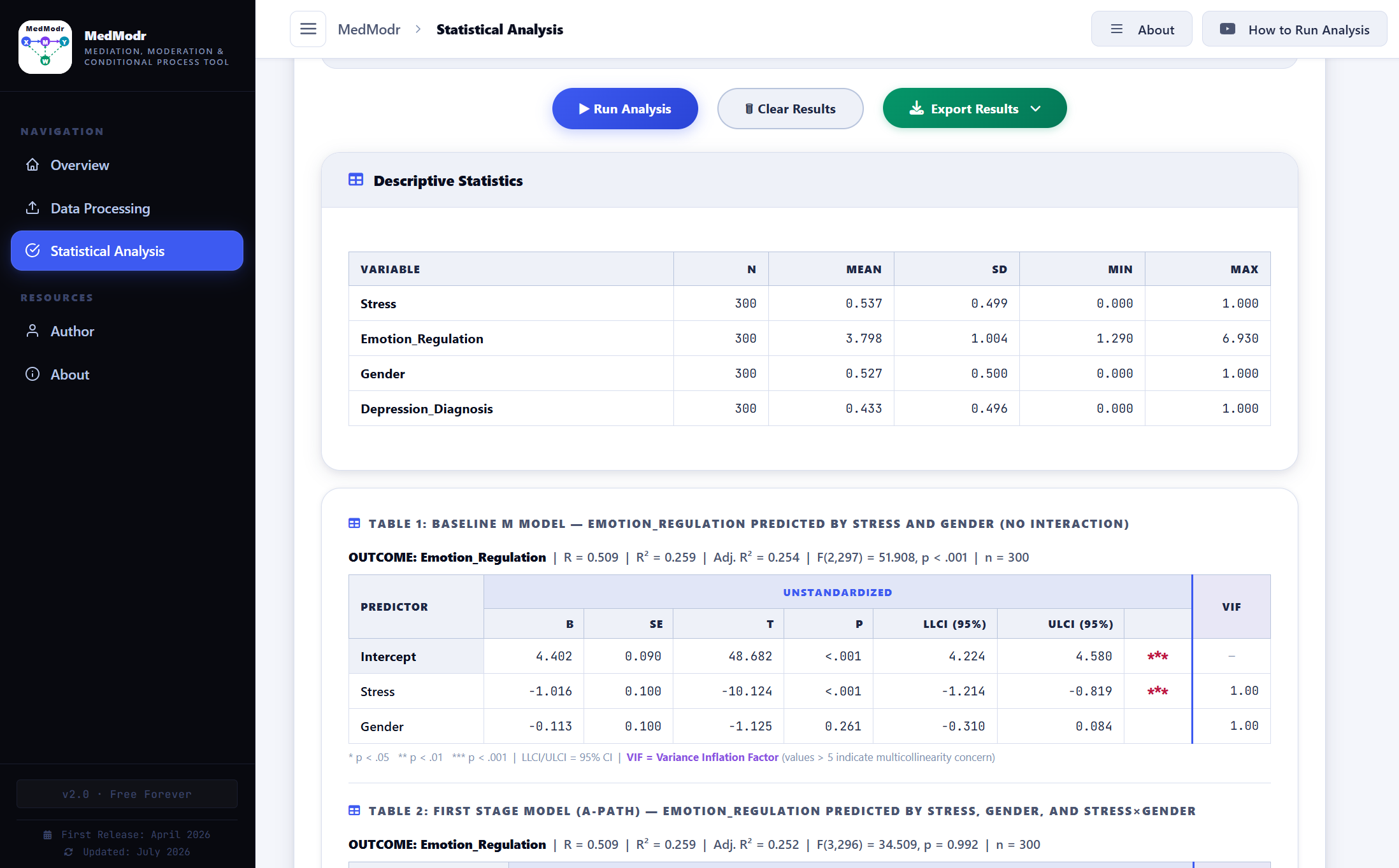
- Variable Specification: Assign dependent, independent, mediator, moderator, and covariate variables according to the selected analytical model.
- Model Selection: Choose from 15 analytical models equivalent to those available in the PROCESS macro.
- Analysis Configuration: Specify bootstrap resampling parameters, confidence level, and centering preferences.
- Results Review: Examine comprehensive output including regression tables, interactive path diagrams, and simple slopes plots.
- Export: Generate formatted Word, PDF, or HTML documents for publication or presentation.
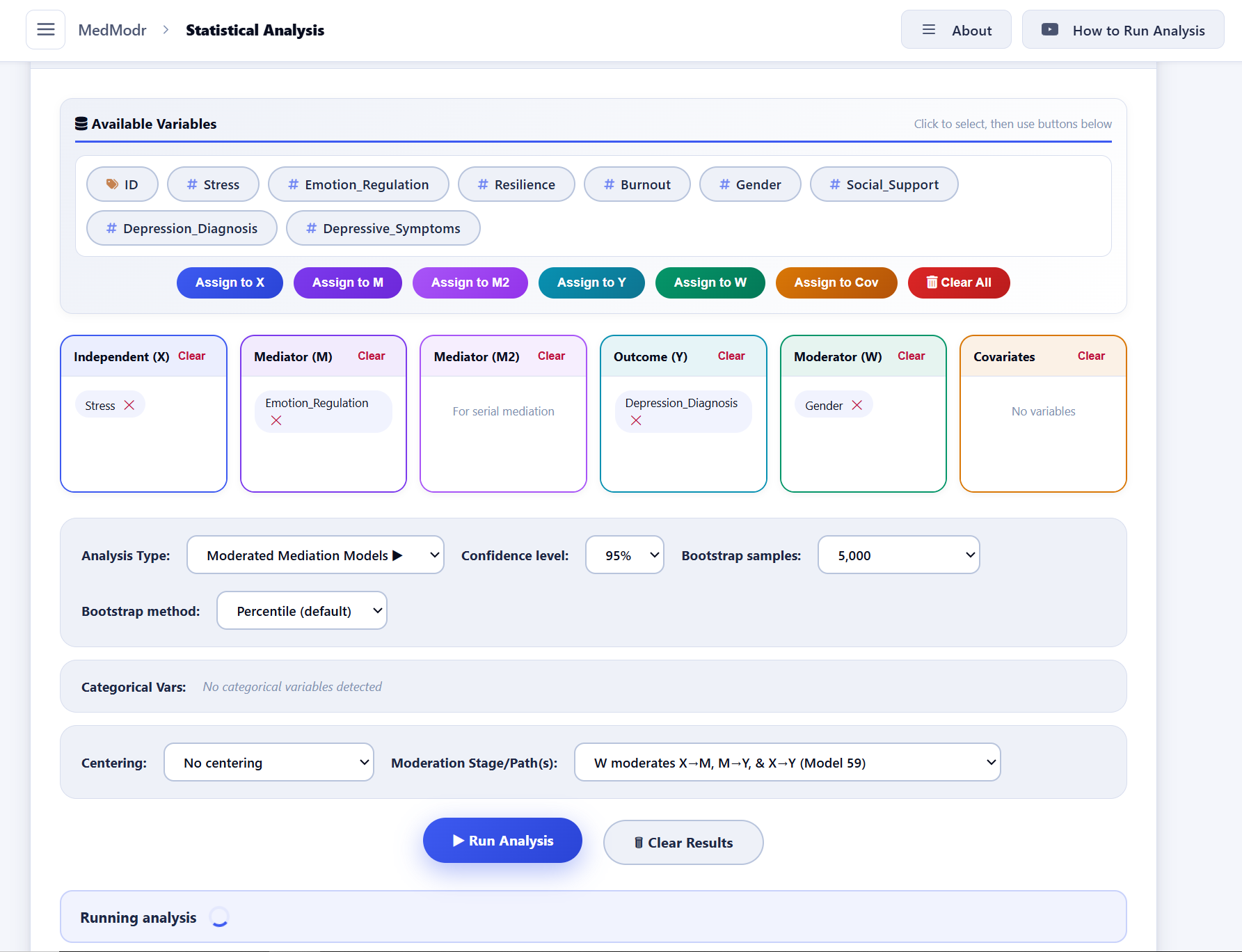
Analysis Types and Variable Assignment
All 15 analytical models are configured through a unified Variable Assignment interface. The following table summarizes the variable requirements and analytical objectives for each model type.
| Analysis Type | Model # | Required Variables | What it tests |
|---|---|---|---|
| Simple Mediation | 4 | X, M, Y | Does M mediate the effect of X on Y? Includes the Sobel test. |
| Parallel Mediation | 4 | X, M (2+), Y | Multiple mediators operating simultaneously. Reports individual and total indirect effects. |
| Serial Mediation | 6 | X, M₁, M₂, Y | Chain mediation: X → M₁ → M₂ → Y. Tests three indirect pathways. |
| Simple Moderation | 1 | X, Y, W (1; W only) | Does W change the effect of X on Y? Includes the X×W interaction and simple slopes. |
| Double Moderation | 2 | X, Y, W (2; W & Z) | Two separate moderators, W and Z. Includes X×W and X×Z interactions. |
| Moderated Moderation | 3 | X, Y, W (2; W & Z) | Three-way interaction: X × W × Z → Y. Includes all two-way interactions. |
| Mediation with Moderated Direct Effect | 5 | X, M, Y, W (1; W only) | W moderates only the direct X→Y path (c′ path). |
| W Moderates X→M | 7 | X, M, Y, W (1; W only) | First-stage moderation: W moderates the X→M (a) path. |
| W Moderates M→Y | 14 | X, M, Y, W (1; W only) | Second-stage moderation: W moderates the M→Y (b) path. |
| W Moderates X→M & M→Y | 58 | X, M, Y, W (1; W only) | W moderates both the a-path and the b-path. |
| W Moderates X→M and X→Y | 8 | X, M, Y, W (1; W only) | W moderates both the a-path (X→M) and the direct path (X→Y). |
| W Moderates M→Y & X→Y | 15 | X, M, Y, W (1; W only) | W moderates both the b-path (M→Y) and the direct path (X→Y). |
| W Moderates All Three Paths | 59 | X, M, Y, W (1; W only) | W moderates the X→M, M→Y, and X→Y paths. |
| W Moderates X→M, Z Moderates M→Y | 9 | X, M, Y, W (2; W & Z) | Two different moderators: W on the a-path and Z on the b-path. |
| Moderated Serial Mediation | 83 | X, M₁, M₂, Y, W (1; W only) | W moderates the X→M₁ path within the serial chain X→M₁→M₂→Y. |
Variable notation:
- W (1; W only) — Requires one moderator variable (W).
- W (2; W & Z) — Requires two moderator variables (W and Z).
You can add any number of covariates to control for confounding variables in all analysis types.
Video Tutorial
A comprehensive step-by-step video tutorial is available to guide users through the complete MedModr workflow. The tutorial covers data import, variable specification, model configuration, results interpretation, and output export for mediation, moderation, and conditional process analyses.
Version History
| Version | Released | Highlights | Download |
|---|---|---|---|
| v2.0 Latest | June 2026 | 15 analysis types (6 new models), automatic logistic regression for binary outcomes, enhanced path diagrams (SVG export), improved export menu (Word, PDF, HTML, CSV), binary moderator support. | Download |
| v1.0 | April 2026 | First release: 9 analysis types, OLS regression, bootstrap CIs, standardized coefficients, CSV/Excel import, Word export, path diagrams. | Download |
The application can also be downloaded from the following trusted repositories:


Citation
Publication
The official article describing MedModr has been published in SoftwareX: https://www.sciencedirect.com/science/article/pii/S2352711026003869
Citing MedModr
If you use MedModr in your research, publications, theses, dissertations, or reports, please cite the article using one of the reference formats provided below:
Ibrahim, M. M. (2026). MedModr: A free, user-friendly, browser-based open-source application for mediation, moderation, and conditional process analyses. SoftwareX, 35, 102895. https://doi.org/10.1016/j.softx.2026.102895
Ibrahim MM. MedModr: A free, user-friendly, browser-based open-source application for mediation, moderation, and conditional process analyses. SoftwareX. 2026;35:102895. doi: 10.1016/j.softx.2026.102895
Ibrahim, M.M., 2026. MedModr: A free, user-friendly, browser-based open-source application for mediation, moderation, and conditional process analyses. SoftwareX, 35, 102895. Available at: https://doi.org/10.1016/j.softx.2026.102895
M. M. Ibrahim, "MedModr: A free, user-friendly, browser-based open-source application for mediation, moderation, and conditional process analyses," SoftwareX, vol. 35, p. 102895, 2026, doi: 10.1016/j.softx.2026.102895
License
MedModr is distributed under the MIT License, a permissive open-source license that permits free use, modification, and redistribution for both commercial and non-commercial purposes. The application may be deployed on institutional or personal servers, allowing organizations and researchers to self-host MedModr while maintaining complete control over their data and computing infrastructure.
MIT License

Copyright (c) MedModr

Permission is hereby granted, free of charge, to any person obtaining a copy
of this software and associated documentation files (the "Software"), to deal
in the Software without restriction, including without limitation the rights
to use, copy, modify, merge, publish, distribute, sublicense, and/or sell
copies of the Software, and to permit persons to whom the Software is
furnished to do so, subject to the following conditions:

The above copyright notice and this permission notice shall be included in all
copies or substantial portions of the Software.

THE SOFTWARE IS PROVIDED "AS IS", WITHOUT WARRANTY OF ANY KIND, EXPRESS OR
IMPLIED, INCLUDING BUT NOT LIMITED TO THE WARRANTIES OF MERCHANTABILITY,
FITNESS FOR A PARTICULAR PURPOSE AND NONINFRINGEMENT. IN NO EVENT SHALL THE
AUTHORS OR COPYRIGHT HOLDERS BE LIABLE FOR ANY CLAIM, DAMAGES OR OTHER
LIABILITY, WHETHER IN AN ACTION OF CONTRACT, TORT OR OTHERWISE, ARISING FROM,
OUT OF OR IN CONNECTION WITH THE SOFTWARE OR THE USE OR OTHER DEALINGS IN THE
SOFTWARE.
Developer
Mudasir Mohammed Ibrahim
Department of Internal Medicine (M3)
Tamale Teaching Hospital, Ghana
Website | GitHub | ResearchGate | LinkedIn | Email
Contributing
Community contributions are welcomed and encouraged. Opportunities for contribution include bug fixes, feature implementation, documentation improvements, and enhancement suggestions. All contributions help advance the development and utility of MedModr.
The preferred contribution method is through pull requests on the GitHub repository. Prior to contributing, please review the CONTRIBUTING.md guide for detailed information on the contribution workflow, coding standards, and submission guidelines.
Alternatively, bug reports and feature requests may be submitted via email to mudassiribrahim30@gmail.com.
When submitting a bug report, please include the following information to facilitate efficient resolution:
- The analytical model being used.
- Browser and version (e.g., Chrome 125, Firefox 127).
- A clear description of the expected versus actual behavior.
- An anonymized sample dataset that reproduces the issue, if available.